Zombie Mode: Kubernetes Cost Optimization
Cut Kubernetes costs by 70% with automated workload scheduling. Schedule dev, staging, and demo environments to sleep during nights and weekends. Free 30-day trial. No credit card required.
The Problem: Wasted Spend on Idle Environments
Most development and staging Kubernetes environments run 24/7 but are only used 40 hours/week.
The waste:
- Dev environments active during nights: 60 hours/week of waste
- Dev environments active during weekends: 48 hours/week of waste
- Total waste: 108 hours/week (65% of the week)
For a typical 3-environment setup (dev, staging, demo):
- Cost without scheduling: $2,160/month (each env: $30/day × 30 days = $900 × 3 = $2,700)
- Cost with Zombie Mode: $756/month (only running 40 hours/week = ~24% utilization)
- Savings: $1,404/month = $16,848/year
That's 72% cost reduction on non-production environments.
How Zombie Mode Works
Simple Scheduling Interface
Monday-Friday: Run 7am-6pm
Weekends: Sleep
Holidays: Optional overrides
Set it and forget it:
- Install Zombie Mode (5-minute Helm install)
- Create schedule template (visual calendar interface)
- Apply to environments
- Automatic cost savings begin immediately
Technical Implementation
What Zombie Mode does:
- Scales pods to zero during scheduled sleep periods
- Triggers cluster autoscaler to deallocate nodes (indirect savings)
- Restores original replica counts when waking up
- Preserves all state: volumes, configs, secrets remain intact
What you get back:
- ✅ Same containers (pulled from registry)
- ✅ Same configurations (ConfigMaps, Secrets)
- ✅ Same persistent volumes (data intact)
- ✅ Same ingress routes (URLs unchanged)
- ⏱️ 2-5 minute wake-up time (depending on image pull)
What continues to work:
- ✅ CI/CD pipelines: You can still deploy updates during sleep periods
- ✅ Deployments remain active: Kubernetes deployment objects stay in the cluster (just scaled to 0 replicas)
- ✅ GitOps syncs: ArgoCD/Flux continue to sync changes
- ✅ Updates apply immediately on wake: New image versions deployed during sleep are pulled when waking up
Zombie State Behavior
During sleep periods:
- Pods scaled to zero (no compute costs)
- Persistent volumes remain (minimal storage costs)
- Ingress routes return
503 Service Temporarily Unavailable - Automatic wake-up at scheduled time
Deployment Options
Option 1: Standalone (Most Popular)
Use Zombie Mode WITHOUT the full Codiac platform.
Perfect for:
- Teams already using ArgoCD, Flux, kubectl, or Terraform
- Just want cost optimization, nothing else
- Proof-of-concept before full platform adoption
- Multi-cloud environments (AWS, Azure, GCP)
Installation:
# 1. Register for free trial (no credit card)
# Visit: https://app.codiac.io/zombie/register

# 2. During registration, provide:
#    - Cluster name (e.g., "dev-cluster")
#    - Namespaces to apply Zombie Mode to (e.g., "dev,staging,demo")
#    - Schedule template: Choose from:
#      • Demo (short test cycles)
#      • Night & Weekend (M-F 7am-6pm active)
#      • Blackout (custom schedule)

# 3. Get your unique installation token after registration
#    The token contains everything: auth, cluster config, namespaces, and schedule

# 4. Install with Helm (5 minutes) - only the token is required
helm upgrade -i zombiemode-installer-release \
  oci://registry-1.docker.io/codiacimages/codiac-zombiemode-chart \
  --version 1.0.0 \
  --namespace zombie-ns \
  --set token="YOUR_REGISTRATION_TOKEN" \
  --create-namespace

# 5. Verify installation
kubectl get pods -n zombie-ns
What the token contains:
- Authentication: JWT credentials for secure communication with Codiac control plane
- Cluster configuration: Cluster name and identifier
- Namespace settings: Which namespaces to manage (from your registration)
- Schedule template: Pre-configured schedule (Demo, Night & Weekend, or Blackout)
- All required settings: No additional configuration needed
What you install:
- Lightweight scheduler agent (50MB, minimal CPU/memory)
- RBAC permissions (read pods/deployments, write replicas in specified namespaces)
- No data egress (scheduling metadata only)
No vendor lock-in:
- Uninstall anytime with
helm uninstall zombiemode-installer-release -n zombie-ns - Your workloads remain unchanged
- Works with any Kubernetes distribution (EKS, AKS, GKE, on-prem)
Option 2: Integrated with Codiac Platform
If you're already using Codiac for deployments:
- Zombie Mode comes built-in (no separate install)
- Integrated with environment management
- Schedule templates shared across teams
- Advanced features (cost analytics, forecasting)
Learn more about the full Codiac platform
Cost Savings Breakdown
Example: Mid-Size SaaS Company
Infrastructure:
- 3 dev environments (5 pods each, 2 vCPU, 4GB RAM per pod)
- 2 staging environments (8 pods each, 2 vCPU, 4GB RAM per pod)
- 1 demo environment (10 pods, 4 vCPU, 8GB RAM per pod)
AWS EKS Pricing (us-east-1):
- EC2 m5.xlarge nodes: $0.192/hour
- Typical pod density: 10 pods per node
Before Zombie Mode (24/7 operation):
Dev environments:
  3 envs × 5 pods = 15 pods
  15 pods / 10 = 2 nodes
  2 nodes × $0.192/hr × 730 hrs/month = $280/month

Staging environments:
  2 envs × 8 pods = 16 pods
  16 pods / 10 = 2 nodes
  2 nodes × $0.192/hr × 730 hrs/month = $280/month

Demo environment:
  1 env × 10 pods = 10 pods
  10 pods / 10 = 1 node
  1 node × $0.192/hr × 730 hrs/month = $140/month

TOTAL: $700/month
After Zombie Mode (Business hours only: M-F 7am-7pm):
Active hours per month:
  - 5 days/week × 12 hours/day = 60 hours/week
  - 60 hours/week × 4.33 weeks/month = 260 hours/month
  - Utilization: 260 / 730 = 35.6%

New costs:
  - Dev: $280 × 35.6% = $100/month
  - Staging: $280 × 35.6% = $100/month
  - Demo: $140 × 35.6% = $50/month

TOTAL: $250/month

SAVINGS: $450/month = $5,400/year (64% reduction)
Additional indirect savings:
- Cluster autoscaler deallocates nodes faster (fewer stragglers)
- LoadBalancer IP addresses released during sleep (AWS: $0.005/hr)
- NAT Gateway data transfer reduced (~$50/month)
Total estimated savings: $500-600/month = $6,000-7,200/year
Zombie Mode cost (value-based pricing):
Monthly fee: 10% of your savings
Example: Save $500/month → Pay $50/month
Net savings: $450/month = $5,400/year

If you save $600/month → Pay $60/month
Net savings: $540/month = $6,480/year
You only pay when you save. Zero risk.
ROI Calculator
Your current costs:
Non-prod environments: ____ pods
Average pod size: ____ vCPU, ____ GB RAM
Cloud provider: [ ] AWS  [ ] Azure  [ ] GCP
Hourly node cost: $____

Monthly cost = (pods / 10) × hourly_cost × 730
With Zombie Mode (40 hours/week schedule):
Utilization: 24% (40 hours / 168 hours)
New monthly cost = current_cost × 0.24
Monthly savings = current_cost - new_monthly_cost

Zombie Mode fee = monthly_savings × 0.10
Net monthly savings = monthly_savings × 0.90
Annual net savings = net_monthly_savings × 12
Pricing model:
- Standalone: 10% of monthly savings (first 30 days free to prove savings)
- Codiac Platform: Included (no additional charge)
Example calculation:
Current cost: $700/month
After Zombie Mode: $250/month
Gross savings: $450/month

Zombie Mode fee (10%): $45/month
Net savings (90%): $405/month = $4,860/year

You keep 90% of all savings. We only succeed when you save.
Comparison: Zombie Mode vs Alternatives
| Feature | Zombie Mode | Karpenter/Cluster Autoscaler | Manual kubectl | Cost Management Tools (Kubecost) |
|---|---|---|---|---|
| Schedule workloads | ✅ Visual calendar | ❌ Requires custom scripting | ❌ Manual commands | ❌ Monitoring only |
| Automatic wake-up | ✅ Scheduled | ❌ Manual trigger | ❌ Manual | ❌ N/A |
| Timezone support | ✅ Per-environment | ❌ N/A | ❌ N/A | ❌ N/A |
| Template library | ✅ Nights/weekends, custom | ❌ N/A | ❌ N/A | ❌ N/A |
| Preserve state | ✅ Automatic | ⚠️ Depends on setup | ⚠️ Manual | ❌ N/A |
| Cost analytics | ✅ Built-in | ❌ None | ❌ None | ✅ Advanced |
| Multi-cluster | ✅ Centralized | ⚠️ Per-cluster config | ❌ Per-cluster kubectl | ✅ Yes |
| Installation time | 5 minutes | 30-60 minutes | N/A | 20-40 minutes |
| Standalone product | ✅ Yes (no lock-in) | ❌ AWS-specific | ✅ Free (manual) | ✅ Yes |
| Pricing | 10% of savings (trial free) | AWS EKS cost | Free | $499+/month |
Why choose Zombie Mode:
- Easier than scripting: No CronJobs, no kubectl scripts, no YAML
- More than autoscaling: Karpenter scales nodes, Zombie Mode schedules workloads
- Cheaper than Kubecost: Kubecost monitors costs, Zombie Mode reduces costs
- No lock-in: Works with any Kubernetes, uninstall anytime
Use Cases
1. Development Environments
Problem: Dev teams work 9am-5pm, but clusters run 24/7.
Zombie Mode schedule:
Monday-Friday: 7am-7pm (active)
Weekends: Sleep
Holidays: Sleep
Result:
- Developers never notice: Environments ready before work starts
- IT saves 70%: Nights/weekends shut down automatically
- No manual intervention: Set-and-forget
Customer example:
"We have 12 development environments. Before Zombie Mode, they cost $1,800/month running 24/7. Now they cost $432/month with business-hours scheduling. We saved $16,400/year."
- DevOps Lead, Series B SaaS Company
2. Staging & QA Environments
Problem: QA runs during business hours + occasional night releases.
Zombie Mode schedule:
Monday-Thursday: 8am-8pm (active)
Friday: 8am-6pm (active)
Weekends: Sleep (except release weekends)
Ad-hoc: Manual override for deployments
Features used:
- Override controls: Wake up staging for off-hours deployment
- Slack notifications: Alert when environment enters sleep mode
- Gradual scale-down: 5-minute grace period before shutdown
Result:
- Staging costs reduced 60%
- Zero disruption to release schedule
- QA team has reliable 8am start
3. Demo & Sandbox Environments
Problem: Demo environments for sales, but demos happen unpredictably.
Zombie Mode schedule:
Monday-Friday: 6am-10pm (active for sales calls across timezones)
Weekends: Sleep
Default: Active (to avoid embarrassing 503 during demos)
Configuration:
- Extended hours: Sales team operates globally
- Quick wake-up: 2-minute restore for urgent demos
- Cost savings: Still 40% reduction (weekends off)
Result:
"Our demo environment ran 24/7 'just in case.' Zombie Mode lets us sleep weekends without risk. Saved $2,400/year on one environment."
- Sales Engineer, B2B Platform
4. CI/CD Pipeline Environments
Problem: Build/test clusters idle most of the day, spike during commits.
Zombie Mode schedule:
Monday-Friday: Always active (builds can happen anytime)
Weekends: Sleep (unless emergency hotfix)
Exception: Wake on webhook trigger (coming soon)
Advanced feature:
- Event-driven wake-up (roadmap): Trigger via CI/CD pipeline webhook
- Partial scheduling: Keep build agents active, scale test runners
Result:
- Weekend savings: ~30% cost reduction
- No impact to CI/CD pipeline performance
5. Multi-Region DR Environments
Problem: DR clusters in standby mode consume resources but rarely used.
Zombie Mode schedule:
Primary region: Always active (production)
DR region: Sleep until failover needed
Testing schedule: Wake DR environment weekly for 2-hour drill
Configuration:
- Manual override: Instant wake-up during disaster
- Scheduled testing: Auto-wake Sundays 2am-4am for DR test
- Cost optimization: DR region only active during tests
Result:
- 95% cost reduction on DR infrastructure
- Automated weekly DR validation
- Peace of mind with instant failover capability
Features & Capabilities
Scheduling
Visual Calendar Interface:
- Drag-and-drop scheduling (15-minute increments)
- Color-coded: Pink = sleeping, Green = active
- Copy schedules across environments
Templates:
Registration Templates (selected during signup):
- Demo: Short test cycles for quick validation and testing
- Night & Weekend: M-F 7am-6pm active, sleep nights/weekends (most popular for dev/staging)
- Blackout: Custom schedule you configure after installation
Additional Templates (available in web UI):
- Business Hours Extended: M-F 6am-10pm active
- 24/7 with Weekend Sleep: Always on weekdays, weekends off
- Custom: Create and save your own schedules
Timezone Support:
- Per-environment timezone configuration
- Automatic DST handling
- Global teams: Different schedules per region
Overrides:
- Manual wake: Instant one-time activation
- Manual sleep: Force shutdown for maintenance
- Holiday schedules: Disable for specific dates
- Exception rules: "Sleep unless deployment webhook received" (roadmap)
Cost Management
Savings Dashboard:
- Current month savings (actual)
- Projected annual savings
- Per-environment breakdown
- Historical trends (3/6/12 months)
Cost Analytics:
- Compute cost attribution per environment
- Node allocation tracking
- Before/after comparison
- ROI calculation (savings vs Zombie Mode cost)
Budgets & Alerts:
- Set monthly budget per environment
- Alert when exceeding budget
- Forecast overages before month-end
Operations
Graceful Shutdown:
- Configurable grace period (default: 5 minutes)
- Sends SIGTERM to pods
- Waits for connections to drain
- Scales to zero after grace period
Wake-Up Process:
- Restore replica counts from last active state
- Kubernetes scheduler assigns pods to nodes
- Cluster autoscaler provisions nodes if needed
- Containers pull images and start
- Readiness probes pass → traffic flows
- Total time: 2-5 minutes
State Preservation:
- Persistent volumes: Remain attached, data intact
- ConfigMaps/Secrets: Unchanged
- Ingress routes: Remain configured (503 during sleep)
- Service IPs: ClusterIP preserved, LoadBalancer may change
Monitoring:
- Zombie state duration tracking
- Wake/sleep event logs
- Failed wake-up alerts (image pull errors, etc.)
- Integration: Slack, PagerDuty, Datadog webhooks
Security & Compliance
RBAC Permissions:
# Zombie Mode requires these permissions:
- apiGroups: ["apps"]
  resources: ["deployments", "statefulsets"]
  verbs: ["get", "list", "watch", "patch"]  # Patch to update replicas

- apiGroups: [""]
  resources: ["pods"]
  verbs: ["get", "list", "watch"]  # Read-only for status checks
Data Privacy:
- No application data leaves cluster
- Only metadata transmitted: pod counts, schedules, environment IDs
- No access to ConfigMaps, Secrets, or application logs
- SOC 2 Type II compliant
Namespace Isolation:
- Zombie Mode runs in dedicated namespace (zombie-ns)
- Only watches namespaces you specified during registration
- You control which namespaces are managed (e.g., include dev/staging, exclude prod/pci)
Getting Started: Free 30-Day Trial
Step 1: Register (2 minutes)
Visit: app.codiac.io/zombie/register
Registration Form:
The registration page guides you through setup with clear instructions:
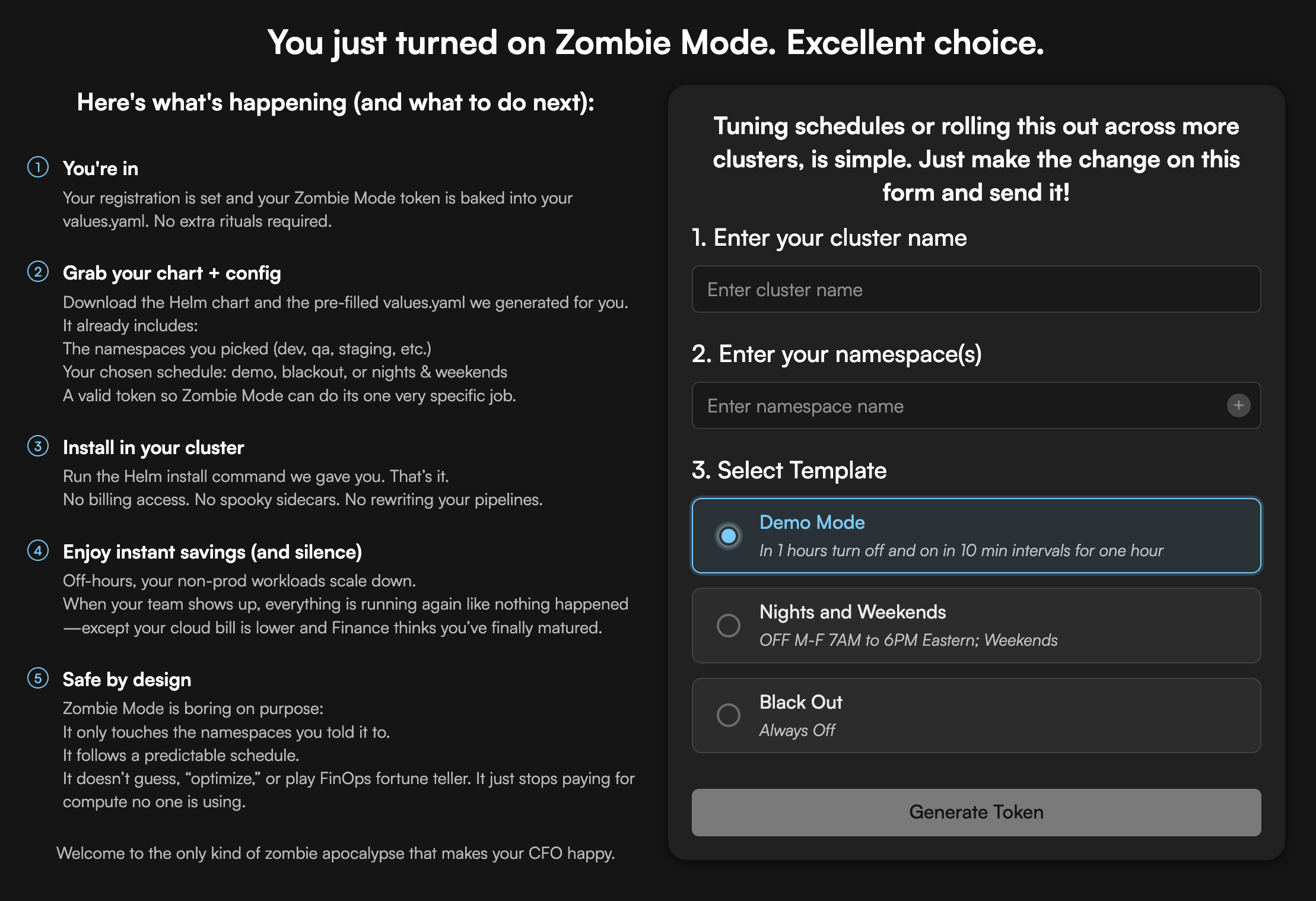
What you'll need to provide:
-
Cluster name (identifier for your cluster)
- Example: "dev-cluster", "staging-us-west", "prod-eks-01"
- Used to identify your cluster in the web UI
-
Namespace(s) (which namespaces to manage)
- Enter one or more namespaces (click + to add more)
- Example: "dev", "staging", "demo"
- Zombie Mode will only affect these namespaces
-
Schedule template (choose one):
- Demo Mode - In 1 hour: turn off and on in 10 min intervals for one hour (quick validation)
- Nights and Weekends - OFF M-F 7AM to 6PM Eastern; Weekends (most popular for dev/staging)
- Black Out - Always Off (custom schedule configured later)
What you'll get:
- Unique registration token - This token contains everything you need:
- Authentication credentials (JWT)
- Cluster configuration
- Namespaces to manage
- Pre-configured schedule template
- All required settings encoded and ready to use
- Access to web UI (app.codiac.io/zombie) for monitoring and management
- 30-day free trial (no credit card required)
The token is all you need - no additional configuration files or parameters required for basic installation.
Step 2: Install Zombie Mode (5 minutes)
Prerequisites:
- Kubernetes cluster (version 1.20+)
- Helm 3 installed
kubectlaccess with admin permissions
Installation:
# Install Zombie Mode - token contains all required configuration
helm upgrade -i zombiemode-installer-release \
  oci://registry-1.docker.io/codiacimages/codiac-zombiemode-chart \
  --version 1.0.0 \
  --namespace zombie-ns \
  --set token="YOUR_REGISTRATION_TOKEN" \
  --create-namespace

# Verify installation
kubectl get pods -n zombie-ns

# Expected output:
# NAME                          READY   STATUS    RESTARTS   AGE
# zombie-scheduler-xxxxx        1/1     Running   0          30s
What gets installed:
- zombie-scheduler: Lightweight scheduler (50MB, 0.1 CPU, 128MB RAM)
- ServiceAccount + RBAC: Permissions to scale deployments in specified namespaces
- ConfigMap: Stores schedule configurations (decoded from registration token)
- Secret: Contains JWT credentials and cluster authentication
What the token provides:
- ✅ Complete authentication - JWT and credentials
- ✅ Namespace configuration - Which namespaces to manage
- ✅ Schedule template - Pre-configured sleep/wake schedule
- ✅ Cluster identity - Unique cluster identifier for web UI
- ✅ All required settings - No additional parameters needed
Installation time: ~3-5 minutes (OCI registry pull + deployment)
Step 3: Create Your First Schedule (3 minutes)
Web UI: app.codiac.io/zombie
- Select environment to schedule (e.g., "dev-01")
- Choose template: Click "Nights & Weekends" or create custom
- Set timezone: Select your team's timezone
- Review schedule: Pink blocks = sleeping, green = active
- Save: Zombie Mode activates immediately
Visual example:
Monday    [7am ========== Active ========== 6pm] Sleep
Tuesday   [7am ========== Active ========== 6pm] Sleep
Wednesday [7am ========== Active ========== 6pm] Sleep
Thursday  [7am ========== Active ========== 6pm] Sleep
Friday    [7am ========== Active ========== 6pm] Sleep
Saturday  [======= Sleep all day =======]
Sunday    [======= Sleep all day =======]
Step 4: Monitor Savings (Ongoing)
Dashboard shows:
- This month: $347 saved
- Projected annual: $4,164 saved
- Sleep hours this week: 108 hours
- Next wake-up: Monday 7:00am EST
Alerts:
- Email when environment enters sleep mode
- Slack notification when wake-up fails (image pull errors)
FAQ: Zombie Mode
Q: Do I need to configure anything after installation?
A: No! The registration token contains all required configuration:
- Authentication - JWT credentials for secure communication
- Cluster identity - Your cluster name and identifier
- Namespaces - Which namespaces to manage (specified during registration)
- Schedule - Pre-configured template (Demo, Night & Weekend, or Blackout)
- Settings - All defaults configured and ready to use
After installation with just the token, Zombie Mode will:
- Automatically connect to Codiac control plane
- Apply the schedule to your specified namespaces
- Begin sleep/wake cycles immediately
You can customize schedules later via the web UI if needed.
Q: What happens if someone tries to access a sleeping environment?
A: The ingress route returns HTTP 503 (Service Temporarily Unavailable). You can customize the 503 page to show:
This environment is currently sleeping.
Next wake-up: Monday at 7:00am EST.

Need immediate access? Contact DevOps or manually wake via app.codiac.io/zombie
Q: Can I manually wake up a sleeping environment?
A: Yes. In the web UI, click "Wake Now" for instant activation. Takes 2-5 minutes depending on image pull time.
Q: What if I need to override the schedule for a late-night deployment?
A: Two options:
- Manual wake: Click "Wake Now" in web UI (stays active until next scheduled sleep)
- Schedule override: Add one-time exception (e.g., "Active Thursday 8pm-11pm for deployment")
Q: Does Zombie Mode work with StatefulSets?
A: Yes. StatefulSets scale to zero during sleep, and persistent volumes remain attached. Data is preserved. However, note:
- Databases: Use managed services (RDS, Cloud SQL) instead of self-hosted
- Stateful apps: Ensure proper shutdown handling (SIGTERM grace period)
- Volume mounts: PVCs remain bound, data intact
Q: Can I exclude specific namespaces or deployments?
A: Yes. You specify which namespaces to include during registration. Zombie Mode only affects the namespaces you explicitly provide (e.g., "dev,staging,demo").
To further exclude specific deployments within those namespaces, configure in the web UI:
Cluster: dev-cluster
Managed namespaces: dev, staging, demo
Exclude deployments: dev/always-on-api, staging/monitoring-stack
Default exclusions: kube-system, kube-public, kube-node-lease are never affected.
Q: How does this work with Horizontal Pod Autoscaler (HPA)?
A: Zombie Mode temporarily overrides HPA:
- During sleep: Sets
spec.replicas = 0(HPA suspended) - During wake: Restores original replica count, HPA resumes
Q: What's the difference between Zombie Mode and cluster autoscaler?
A: Different purposes:
- Cluster autoscaler: Scales nodes based on pod resource requests (reactive)
- Zombie Mode: Scales pods based on schedule (proactive)
Use together: Zombie Mode scales pods to zero → Cluster autoscaler deallocates nodes → Maximum savings
Q: Can I deploy updates while the environment is sleeping?
A: Yes! CI/CD and deployments continue to work normally:
- Kubernetes deployments remain in the cluster (just scaled to 0 replicas)
- You can update image tags, configs, or manifests anytime via kubectl, Helm, ArgoCD, Flux, etc.
- Changes are applied immediately to the deployment spec
- Pods remain at 0 replicas until scheduled wake-up time
- On wake-up, new version is deployed automatically
Example workflow:
- Environment sleeping (0 replicas)
- Developer pushes code → CI/CD builds new image
myapp:1.2.4 - CI/CD updates deployment:
kubectl set image deployment/my-api api=myapp:1.2.4 - Deployment updated successfully (still 0 replicas)
- Monday 7am: Zombie Mode wakes environment → New version
1.2.4starts automatically
Q: Can I use Zombie Mode with ArgoCD or Flux?
A: Yes. Zombie Mode works with any GitOps tool:
- GitOps controls desired state in Git
- Zombie Mode temporarily scales pods to zero
- When waking, Zombie Mode restores replica counts
- ArgoCD/Flux sees no drift (replicas still in sync with schedule)
- GitOps syncs continue during sleep - changes are applied to deployments even at 0 replicas
Q: Does this work on EKS, AKS, GKE, and on-prem Kubernetes?
A: Yes, all of them:
- ✅ AWS EKS (Elastic Kubernetes Service)
- ✅ Azure AKS (Azure Kubernetes Service)
- ✅ Google GKE (Google Kubernetes Engine)
- ✅ On-premises Kubernetes (Rancher, OpenShift, vanilla K8s)
- ✅ Managed Kubernetes on DigitalOcean, Linode, etc.
Requirement: Kubernetes 1.20+ with Helm 3 support
Q: What if I cancel after the 30-day trial?
A: Two options:
- Uninstall completely:
helm uninstall zombiemode-installer-release -n zombie-ns- Your workloads remain unchanged
- Schedules are deleted
- No vendor lock-in
- Keep installed, disable schedules: Zombie Mode remains but does nothing (free to keep)
Q: Can I see how much I'm saving before I pay?
A: Yes. The 30-day free trial includes full cost analytics:
- Real-time savings dashboard
- Monthly and annual projections
- Per-environment breakdown
- Export reports to CSV
After 30 days, you only pay 10% of your proven savings. Zero risk - you only pay when you save.
Q: Is there a minimum commitment?
A: No. Monthly billing based on your actual savings, cancel anytime. No contracts, no annual commitment.
Q: Can I manage multiple clusters with one Zombie Mode account?
A: Yes. You can:
- Use the same registration token on multiple clusters (they'll share the same namespaces and schedule)
- Register each cluster separately with different namespaces/schedules per cluster
- Mix and match - some clusters with shared config, others with unique configs
All clusters appear in the web UI for centralized management.
Pricing:
- Standalone: 10% of monthly savings (unlimited clusters and environments)
- Enterprise: Custom pricing for 50+ clusters or special requirements
Installation Options
Standalone Installation (Helm)
For teams using their own deployment tools (not Codiac platform).
Basic installation (recommended):
# The token is all you need - it contains auth, namespaces, schedule, and settings
helm upgrade -i zombiemode-installer-release \
  oci://registry-1.docker.io/codiacimages/codiac-zombiemode-chart \
  --version 1.0.0 \
  --namespace zombie-ns \
  --set token="YOUR_REGISTRATION_TOKEN" \
  --create-namespace
Advanced installation with optional overrides:
# Override defaults for advanced use cases (optional)
helm upgrade -i zombiemode-installer-release \
  oci://registry-1.docker.io/codiacimages/codiac-zombiemode-chart \
  --version 1.0.0 \
  --namespace zombie-ns \
  --set token="YOUR_REGISTRATION_TOKEN" \
  --set timezone=America/New_York \
  --set enableSlackNotifications=true \
  --set slackWebhookUrl=https://hooks.slack.com/services/YOUR/WEBHOOK \
  --create-namespace
Configuration options:
| Parameter | Description | Required? |
|---|---|---|
token | Registration token from app.codiac.io/zombie/register Contains: auth credentials, cluster identity, namespaces, schedule template, and all settings | ✅ REQUIRED |
timezone | Override timezone (optional - token includes default) | ❌ Optional |
enableSlackNotifications | Send alerts to Slack | ❌ Optional |
slackWebhookUrl | Slack webhook for notifications | ❌ Optional |
gracePeriodSeconds | Seconds to wait before scaling to zero | ❌ Optional (default: 300) |
wakeUpCheckIntervalSeconds | How often to check for scheduled wake-ups | ❌ Optional (default: 60) |
resources.limits.cpu | CPU limit for scheduler pod | ❌ Optional (default: 200m) |
resources.limits.memory | Memory limit for scheduler pod | ❌ Optional (default: 256Mi) |
Important: The token parameter is all you need - it's an encoded configuration containing:
- Authentication (JWT + credentials)
- Cluster identity and name
- Namespaces to manage (from registration)
- Schedule template (Demo, Night & Weekend, or Blackout)
- Default timezone and all settings
Other parameters are optional overrides for advanced use cases.
Upgrade:
helm upgrade zombiemode-installer-release \
  oci://registry-1.docker.io/codiacimages/codiac-zombiemode-chart \
  --version 1.0.0 \
  --namespace zombie-ns
Uninstall:
helm uninstall zombiemode-installer-release -n zombie-ns
kubectl delete namespace zombie-ns
Integrated with Codiac Platform
If you're using the full Codiac platform, Zombie Mode is built-in.
No separate installation needed:
- Automatically deployed during cluster initialization
- Managed through Codiac web UI or CLI
- Integrated with environment management
CLI commands:
# Create schedule for environment
cod zombie schedule create dev-env \
  --template nights-and-weekends \
  --timezone America/Los_Angeles

# View current schedules
cod zombie schedule list

# Manually wake environment
cod zombie wake dev-env

# View savings
cod zombie savings --environment dev-env
Learn more about the full Codiac platform
Pricing
Standalone Zombie Mode
Value-based pricing - You only pay when you save:
| Plan | Price | Features |
|---|---|---|
| Free Trial | $0 | 30 days to prove savings, unlimited clusters/environments, full features |
| Standard | 10% of monthly savings | Unlimited clusters/environments, cost analytics, Slack/email alerts |
| Enterprise | Custom | 50+ clusters, advanced features, dedicated support, volume discounts |
How it works:
Your savings: $500/month → You pay: $50/month → You keep: $450/month
Your savings: $1,000/month → You pay: $100/month → You keep: $900/month
Your savings: $2,000/month → You pay: $200/month → You keep: $1,800/month
Transparent billing:
- ✅ You keep 90% of all savings
- ✅ Billed monthly based on actual proven savings
- ✅ All features included (unlimited environments, schedules, clusters)
- ✅ Cancel anytime (no commitment, no minimum)
- ✅ Free 30-day trial to verify savings before paying
Why value-based pricing:
- Zero risk: You only pay when you save money
- Aligned incentives: We succeed when you save more
- Transparent: See exact savings in dashboard before billing
- Fair: Pay proportional to value received
Enterprise features (custom pricing):
- Volume discounts for 50+ clusters
- SSO/SAML authentication
- Advanced RBAC (team-based schedule permissions)
- Custom integrations (PagerDuty, ServiceNow)
- SLA with dedicated support
- Multi-tenancy (separate accounts per team)
- Custom billing cycles
Full Codiac Platform (Zombie Mode Included)
If you use the full Codiac platform for deployments:
- Zombie Mode included at no extra cost
- Part of the unified environment management
- Advanced features: Cost forecasting, budget alerts, anomaly detection
Security & Compliance
Data Privacy
What Zombie Mode collects:
- Environment names and IDs
- Schedule configurations (times, timezones)
- Pod counts and replica state (for scaling)
- Cost metadata (node types, hours active)
What Zombie Mode does NOT collect:
- Application data or logs
- ConfigMaps or Secrets (never accessed)
- Container images or code
- User credentials or API keys
Data transmission:
- HTTPS-only communication with Codiac API
- Metadata only (no application data)
- Stored in SOC 2 compliant infrastructure
Kubernetes Permissions
RBAC permissions required (least privilege):
apiVersion: rbac.authorization.k8s.io/v1
kind: ClusterRole
metadata:
  name: zombie-mode-scheduler
rules:
# Read pod and deployment state
- apiGroups: ["", "apps"]
  resources: ["pods", "deployments", "statefulsets"]
  verbs: ["get", "list", "watch"]

# Scale deployments/statefulsets (update replicas)
- apiGroups: ["apps"]
  resources: ["deployments/scale", "statefulsets/scale"]
  verbs: ["update", "patch"]

# NO permissions to:
# - Delete resources
# - Access secrets or configmaps
# - Modify pod specs (only replica counts)
Compliance
Certifications:
- SOC 2 Type II (audited annually)
- GDPR compliant (data residency options)
- ISO 27001 (information security)
Audit trail:
- All schedule changes logged with user, timestamp
- Wake/sleep events tracked
- Cost attribution per environment
- Export audit logs for compliance reporting
Enterprise security:
- SSO/SAML support (Okta, Azure AD, Google Workspace)
- IP allowlisting for web UI access
- Webhook signature validation (HMAC-SHA256)
- Encrypted at rest (AES-256)
- Encrypted in transit (TLS 1.3)
Support & Resources
Documentation
- Getting Started Guide - Step-by-step setup
- CLI Reference - Command-line management
- FAQ: Zombie Mode - Common questions
Support Channels
Community (Free):
- Discord - Community help and discussions
- GitHub Issues - Bug reports and feature requests
- Documentation - Self-service guides
Email Support (Paid plans):
- Standard: Email support (24-hour response)
- Enterprise: Priority support (4-hour response) + dedicated Slack channel
Professional Services:
- Migration assistance (existing scheduling solutions → Zombie Mode)
- Custom integration development
- Training workshops for platform teams
Community
Join 2,500+ Kubernetes users optimizing costs with Zombie Mode:
- Share schedule templates
- Cost savings tips
- Integration examples
- Use case discussions
Start Your Free 30-Day Trial
No credit card required. No commitment. Cancel anytime.
- Register for free trial
- Install Zombie Mode (5 minutes)
- Create your first schedule (3 minutes)
- Start saving immediately
Questions?
- Sales: chris@codiac.io
- Support: support@codiac.io
- Book a demo: codiac.io
Related Documentation
- Web UI Guide: Zombie Mode
- CLI Guide: Zombie Mode
- FAQ: Cost Optimization
- What is Codiac? - Full platform overview
Last updated: 2026-01-24