Dynamic Configuration Management
Configure applications at deployment time, not build time. Stop rebuilding container images for configuration changes. Codiac's hierarchical configuration system lets you deploy the same image across dev, staging, and production with environment-specific settings.
The Codiac CLI guides you through each command interactively. You don't need to memorize flags, just run the command and the CLI prompts you for what it needs.
The Problem: Configuration Sprawl
In traditional Kubernetes environments, configuration fragments scatter across multiple tools and files:
| Where Config Lives | What You're Managing |
|---|---|
| Helm values.yaml | Per-environment values files (values-dev.yaml, values-prod.yaml) |
| Kustomize overlays | Base configs + patches for every environment |
| GitOps repos | ArgoCD/Flux ApplicationSets and sync configs |
| SOPS/sealed-secrets | Encrypted files per environment, key management |
| CI/CD pipelines | Environment variables baked into build scripts |
| Dockerfiles | Hardcoded values, secrets in build args |
The result: To change LOG_LEVEL across your stack, you're editing 5+ files across 3+ repos.
Traditional approach: Bake configuration into container images.
# DON'T DO THIS
FROM node:18
COPY . /app
ENV DATABASE_URL=postgres://prod-db:5432/app  # ❌ Hardcoded
ENV API_KEY=sk-1234567890abcdef              # ❌ Secret in image
RUN npm install && npm build
Problems:
- Separate images per environment (app:dev, app:staging, app:prod)
- Secrets baked into images (security nightmare)
- Slow iteration (rebuild + push for every config change)
- Configuration sprawl (same values duplicated across Helm values, Kustomize overlays, and Dockerfiles)
- Can't promote (dev image != staging image != prod image)
Result: Config drift, security vulnerabilities, tribal knowledge about "where that setting lives."
How Codiac Solves It: Config-on-Deploy
Better approach: One image, many configurations.
# Build once
docker build -t myregistry/app:1.2.3 .
docker push myregistry/app:1.2.3

# Set environment-specific configuration
codiac config set
# The CLI prompts you for scope (environment, cabinet, or asset), key, and value
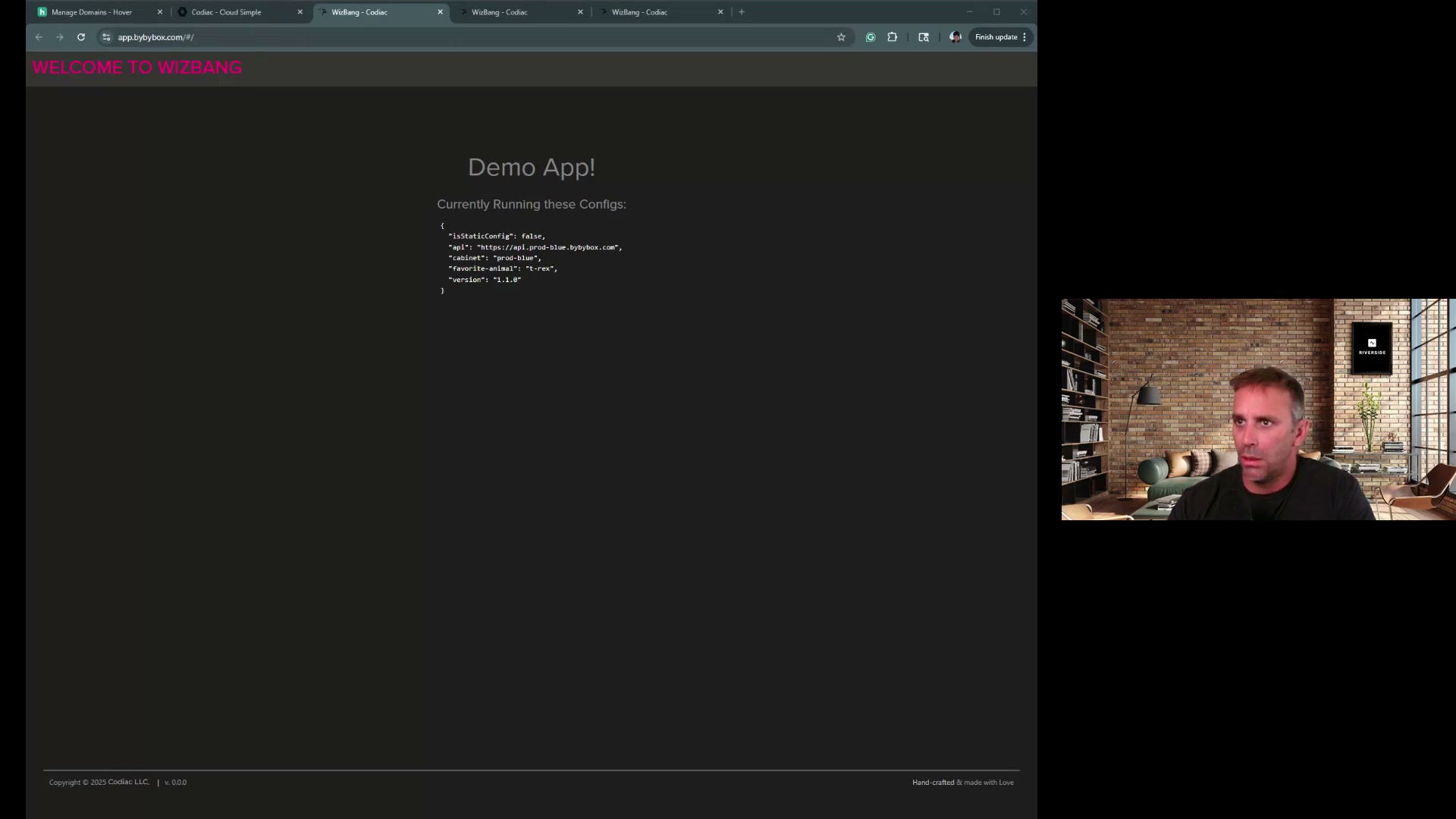
Deploy the same image to all environments, configuration is applied at deploy time based on the target cabinet.
Set up configuration per environment:
codiac config set
# Select dev environment → DATABASE_URL → postgres://dev-db:5432/app

codiac config set
# Select staging environment → DATABASE_URL → postgres://staging-db:5432/app

codiac config set
# Select prod environment → DATABASE_URL → postgres://prod-db:5432/app
Then deploy:
codiac asset deploy
# The CLI prompts you to select asset, version, and cabinet
Result: Same artifact (image), different runtime behavior per environment.
Key Concepts
1. Configuration Hierarchy (Inheritance)
Configurations inherit from broader scopes to narrower scopes:
Tenant Level (global)
  ↓
Enterprise Level (organization-wide)
  ↓
Environment Level (dev, staging, prod)
  ↓
Cabinet Level (namespace/team)
  ↓
Asset Level (specific application)
Example inheritance:
# Set global log level (applies to all assets)
codiac config set
# Select enterprise scope → LOG_LEVEL → info

# Override for staging environment (more verbose logging)
codiac config set
# Select staging environment → LOG_LEVEL → debug

# Override for specific asset in production (extra verbose for troubleshooting)
codiac config set
# Select asset scope → api in prod → LOG_LEVEL → trace
Result:
- Dev assets:
LOG_LEVEL=info(from enterprise) - Staging assets:
LOG_LEVEL=debug(from environment) - Prod API asset:
LOG_LEVEL=trace(from asset) - Prod other assets:
LOG_LEVEL=info(from enterprise)
Hierarchy rules:
- More specific overrides less specific
- Missing values inherit from parent scope
- No value at any level = not set (app must handle undefined env vars)
2. Separation of Secrets and Config
Configuration (non-sensitive):
- Stored in Kubernetes ConfigMaps
- Visible in UI and CLI
- Version-controlled in Codiac snapshots
- Examples:
API_URL,FEATURE_FLAGS,MAX_CONNECTIONS
Secrets (sensitive):
- Stored in cloud provider vaults (AWS Secrets Manager, Azure Key Vault, GCP Secret Manager)
- Never visible in plaintext in Codiac UI
- Referenced by name, injected at runtime
- Examples:
DATABASE_PASSWORD,API_KEY,JWT_SECRET
Best practice:
# Configuration (stored in ConfigMap)
codiac config set
# Select prod environment → DATABASE_HOST → postgres.us-east-1.rds.amazonaws.com

# Secrets: Store in AWS Secrets Manager, Azure Key Vault, or GCP Secret Manager
# Then reference them in your application via the cloud provider's SDK or CSI driver
3. Deployment-Time Rendering
When you deploy an asset, Codiac:
- Assembles all applicable configuration values (from tenant → asset hierarchy)
- Resolves secret references
- Injects into Kubernetes Deployment as environment variables or mounted files
- Pods start with fully-rendered configuration
No intermediate storage - configuration assembled fresh on each deployment.
Common Use Cases
Use Case 1: Promote Image Across Environments
Goal: Deploy same container image from dev → staging → prod.
# Build and push once
docker build -t myregistry/app:v2.5.0 .
docker push myregistry/app:v2.5.0

# Deploy to dev (with dev config)
codiac asset deploy
# Select api, version v2.5.0, and dev cabinet

# Test in dev, then promote to staging (same image, different config)
codiac asset deploy
# Select api, version v2.5.0, and staging cabinet

# Promote to production (same image, prod config)
codiac asset deploy
# Select api, version v2.5.0, and prod cabinet
Configuration automatically applied per environment:
- Dev:
DATABASE_URL=dev-db,CACHE_TTL=10s,DEBUG=true - Staging:
DATABASE_URL=staging-db,CACHE_TTL=60s,DEBUG=false - Prod:
DATABASE_URL=prod-db,CACHE_TTL=600s,DEBUG=false
Key insight: You're deploying the exact same artifact that was tested in dev. Zero drift.
Use Case 2: Feature Flags Per Environment
Goal: Enable features progressively (internal → staging → prod).
# Enable new feature in dev
codiac config set
# Select dev environment → FEATURE_NEW_CHECKOUT → true

# Test in dev, enable in staging
codiac config set
# Select staging environment → FEATURE_NEW_CHECKOUT → true

# Deploy to production but keep feature disabled initially
codiac config set
# Select prod environment → FEATURE_NEW_CHECKOUT → false

# Enable in prod when ready (just update the config value)
codiac config set
# Select prod environment → FEATURE_NEW_CHECKOUT → true
Pods automatically restart with new configuration (Kubernetes rolling update).
Use Case 3: Multi-Region Configuration
Goal: Same application in multiple regions with region-specific settings.
# US region configuration
codiac config set
# Select prod-us cabinet → AWS_REGION → us-east-1
codiac config set
# Select prod-us cabinet → CACHE_ENDPOINT → redis.us-east-1.cache.amazonaws.com

# EU region configuration
codiac config set
# Select prod-eu cabinet → AWS_REGION → eu-west-1
codiac config set
# Select prod-eu cabinet → CACHE_ENDPOINT → redis.eu-west-1.cache.amazonaws.com
Same image deployed to both cabinets:
codiac asset deploy
# Select api and prod-us cabinet

codiac asset deploy
# Select api and prod-eu cabinet
Use Case 4: Temporary Configuration Override
Goal: Temporarily increase log verbosity for debugging, then revert.
# Increase logging for specific asset
codiac config set
# Select asset scope → api in prod → LOG_LEVEL → debug

# Debug for 30 minutes

# Revert by removing the asset-level override in the web UI
# The asset will then inherit from the parent environment/enterprise level
Pods restart with new log level immediately.
Configuration Formats
Environment Variables (Default)
# Simple key-value pairs
codiac config set
# Select asset scope → api → PORT → 8080

codiac config set
# Select environment scope → prod → MAX_WORKERS → 4
Application receives:
export PORT=8080
export MAX_WORKERS=4
File-Based Configuration
For complex configs (JSON, YAML, TOML, XML), use the Codiac web UI at app.codiac.io to upload configuration files that will be mounted as volumes in your containers.
Application reads:
const config = require('/etc/app/config.json');
Multi-Line Values
The Codiac web UI supports multi-line configuration values for certificates, SSH keys, and other complex strings.
Secrets Integration
Codiac integrates with cloud-native secret stores instead of storing secrets directly.
AWS Secrets Manager
# Create secret in AWS Secrets Manager first
aws secretsmanager create-secret \
  --name prod/database-password \
  --secret-string "super-secure-password"
Reference secrets in your application using the AWS SDK or Kubernetes CSI Secrets Store Driver.
Azure Key Vault
# Create secret in Azure Key Vault
az keyvault secret set \
  --vault-name prod-keyvault \
  --name database-password \
  --value "super-secure-password"
Reference secrets in your application using the Azure SDK or Kubernetes CSI Secrets Store Driver.
GCP Secret Manager
# Create secret in GCP
gcloud secrets create database-password \
  --data-file=- <<< "super-secure-password"
Reference secrets in your application using the GCP SDK or Kubernetes CSI Secrets Store Driver.
Best Practice
Store secrets in your cloud provider's secret manager and reference them in your application:
- AWS: Use AWS Secrets Manager with CSI Secrets Store Driver
- Azure: Use Azure Key Vault with CSI Secrets Store Driver
- GCP: Use GCP Secret Manager with CSI Secrets Store Driver
This keeps secrets out of Kubernetes and provides audit logging, rotation, and access control.
Configuration Best Practices
1. Minimize Scope Overrides
Anti-pattern: Every asset has its own config values (configuration explosion).
Better: Use inheritance - set at highest applicable scope.
# ❌ BAD: Setting for every asset individually
# Setting LOG_LEVEL separately for api, web, worker, cron...

# ✅ GOOD: Set once at environment level
codiac config set
# Select prod environment → LOG_LEVEL → info
# All assets in prod automatically inherit this value
2. Use Descriptive Keys
# ❌ BAD
# URL=https://api.example.com
# KEY=abc123

# ✅ GOOD
# PAYMENT_GATEWAY_URL=https://api.stripe.com
# STRIPE_PUBLISHABLE_KEY=pk_live_abc123
3. Document Required vs Optional Config
In your application:
const config = {
  // Required (app crashes if missing)
  databaseUrl: process.env.DATABASE_URL || (() => { throw new Error('DATABASE_URL required') })(),

  // Optional (has sensible default)
  logLevel: process.env.LOG_LEVEL || 'info',
  maxConnections: parseInt(process.env.MAX_CONNECTIONS) || 10
};
4. Never Store Secrets in Configuration
Wrong:
# ❌ NEVER store secrets as config values
# API_KEY=sk-prod-1234567890
Right:
# ✅ Store in cloud secret manager
aws secretsmanager create-secret --name prod/api-key --secret-string "sk-prod-1234567890"

# Reference in your application using AWS SDK or CSI Secrets Store Driver
Viewing Configuration
View Effective Configuration for Asset
Use the Codiac web UI at app.codiac.io to view all configuration values for any asset. The UI shows:
- All config values that will be injected into pods
- The scope (enterprise, environment, cabinet, or asset) where each value is defined
- Whether values are inherited or directly set
Example view:
Scope        Key                Value                          Source
-----------  -----------------  -----------------------------  -----------
enterprise   LOG_FORMAT         json                           Inherited
environment  LOG_LEVEL          info                           Inherited
cabinet      DATABASE_HOST      prod-db.us-east-1.rds.aws.com  Inherited
asset        PORT               8080                           Direct
View Configuration Hierarchy
The web UI shows the full inheritance chain for any configuration key, making it easy to understand where values come from and how overrides work.
Example hierarchy:
Configuration Key: LOG_LEVEL

Effective Value: debug
Source: asset (prod/api)

Inheritance Chain:
- Enterprise:  info
- Environment: info
- Cabinet:     (not set)
- Asset:       debug  ← EFFECTIVE VALUE
Comparison: Codiac vs Alternatives
| Feature | Codiac | Humanitec | Manual ConfigMaps | Helm Values |
|---|---|---|---|---|
| Config-on-deploy | ✅ Yes | ✅ Yes | ❌ Manual | ⚠️ Via values files |
| Hierarchical inheritance | ✅ 5 levels | ⚠️ Limited | ❌ No | ❌ No |
| Cloud secrets integration | ✅ AWS, Azure, GCP | ✅ Yes | ⚠️ Via CSI driver | ⚠️ External Secrets |
| Zero rebuilds for config | ✅ Yes | ✅ Yes | ✅ Yes | ✅ Yes |
| Configuration versioning | ✅ Snapshot-based | ✅ Yes | ❌ Git only | ⚠️ Helm history |
| Multi-environment deploy | ✅ Same image | ✅ Same image | ⚠️ Manual | ⚠️ Separate releases |
| Configuration reuse | Set at parent level, inherited by all children automatically | ⚠️ Per-app config | Duplicate ConfigMap per namespace/environment | Duplicate values files per release |
| GitOps compatibility | ✅ Works alongside GitOps tools - simplifies config management | ✅ Yes | ✅ Native | ✅ Native |
| Learning curve | Low (simple CLI) | Medium (YAML platform) | Medium (K8s concepts) | High (Helm templating) |
Traditional approach: Define LOG_LEVEL=info in 3 environments × 5 namespaces × 20 services = 300 configuration entries to maintain. Update requires changing 300 locations.
Codiac hierarchical config: Set LOG_LEVEL=info at the environment level = 1 action. All 100 production services inherit automatically.
Update everywhere: Change the environment-level value = 1 action, instantly applied to all services.
Because Codiac configurations inherit through the hierarchy (enterprise → environment → cabinet → asset), you configure common settings once and never repeat them. This eliminates configuration drift, reduces documentation burden, and makes global changes trivial.
Advanced: Configuration Templating
Use variables in configuration values:
Set a configuration value with template variables via the web UI or CLI:
API_URL=https://{{ASSET_NAME}}.{{ENVIRONMENT}}.mycompany.com
Codiac resolves at deployment time:
For asset "payments" in environment "prod": https://payments.prod.mycompany.com
Available template variables:
{{ASSET_NAME}}- Name of the deployed asset{{CABINET}}- Cabinet name{{ENVIRONMENT}}- Environment name{{CLUSTER}}- Cluster name{{NAMESPACE}}- Kubernetes namespace
Troubleshooting
Config Not Applied to Pods
Symptoms: Pods running with old configuration values.
Causes:
- Config not saved - Verify in the Codiac web UI
- Pods not restarted - Codiac triggers rolling update, but may fail if deployment paused
- App caching config - Application must read env vars on startup, not cache indefinitely
Solution:
Redeploy the asset to force pods to restart with new configuration:
codiac asset deploy
# Select the asset and cabinet
Secret Value Not Resolving
Symptoms: Pod crashes with "DATABASE_PASSWORD not set"
Causes:
- Secret doesn't exist in cloud provider - Verify in AWS/Azure/GCP console
- IAM permissions missing - Pod service account needs permission to read secret
- Wrong secret name - Check spelling and path
Debug:
Check your cloud provider's secret manager console to verify the secret exists. Then check your pod's service account has the required IAM permissions to access the secret.
Related Documentation
- System Versioning - Configuration captured in snapshots
- Release Management - Promoting configs across environments
- CLI: Configuration Management - Command reference
- CLI: Secret Management - Secret integration
- Web UI: Configuration - Visual config editing
FAQ
Q: Do I need to rebuild my image to change configuration?
A: No. Configuration changes trigger pod restarts, not image rebuilds.
Q: Can I use Codiac config with existing ConfigMaps?
A: Yes. Codiac-managed config coexists with manually-created ConfigMaps/Secrets.
Q: How do I migrate from baked-in config to dynamic config?
A: Gradually. Start by extracting one config value per deployment. No need to migrate everything at once.
Q: Does configuration inheritance work across clusters?
A: Yes. Environment-level config applies to all clusters in that environment.
Q: Can I version control my configuration?
A: Yes. Codiac snapshots capture all configuration. You can also export config to YAML and version in Git.
Stop rebuilding for config changes: Get started with dynamic configuration