Kubernetes Cluster Upgrade Checklist: Zero-Downtime Migration
A practical checklist for planning and running zero-downtime Kubernetes cluster upgrades, whether you do manual blue/green or use Codiac. Codiac is built for platform teams who want Kubernetes to be repeatable and boring so they can focus on architecture, security, and scale. Blue/green upgrade with Codiac: ~30 minutes | Manual in-place upgrade: 2–4 hours.
What you'll get
- A pre-upgrade checklist (version compatibility, backups, testing)
- In-place vs blue/green comparison and a recommended path
- Step-by-step migration and cutover steps
- Rollback and post-upgrade verification
- About 15 minutes to read; 30–60 minutes to execute (blue/green)
Prerequisites
- Access to create or manage Kubernetes clusters (EKS, AKS, GKE, or self-managed)
- For blue/green: multi-cluster or cluster-creation capability (e.g. Codiac cluster hopping)
- Staging or non-production cluster to test the upgrade path first (recommended)
Quick Start
In a hurry? Skip in-place upgrades. Create a new cluster with the target Kubernetes version, deploy your workloads there, validate, then switch traffic (blue/green). Roll back by switching traffic back. With Codiac: Cluster upgrades and Cluster hopping (Web). The rest of this guide is a full checklist (compatibility, backups, cutover, rollback).
The Problem: Cluster Upgrades Are High-Risk Operations
Upgrading a Kubernetes cluster is one of the most stressful tasks for platform teams. In-place upgrades risk production downtime, require maintenance windows, and often reveal unexpected compatibility issues only after it's too late.
Common pain points:
- Manual coordination: Multiple teams need to coordinate upgrades across applications
- Unpredictable failures: API deprecations, pod evictions, and network disruptions
- Long maintenance windows: 2-4 hours of planned downtime (or longer if something breaks)
- Difficult rollback: Once started, rolling back an in-place upgrade is complex and risky
This guide provides a comprehensive checklist for planning and executing zero-downtime Kubernetes cluster upgrades, whether you're doing manual blue/green migrations or using automated tools.
Upgrade Strategy: In-Place vs Blue/Green
In-Place Upgrade (Traditional)
Upgrade nodes one at a time in the existing cluster.
Pros:
- No additional infrastructure costs during upgrade
- Simpler for small, non-critical clusters
Cons:
- Production traffic at risk during upgrade
- Difficult to roll back if problems occur
- Requires maintenance window
- Node-by-node upgrades take 2-4 hours
Blue/Green Cluster Migration (Recommended)
Deploy a new cluster with the target Kubernetes version, validate, then migrate traffic.
Pros:
- Zero production risk: Old cluster untouched until cutover
- Instant rollback: Switch traffic back to old cluster if issues arise
- Parallel validation: Test new cluster with production traffic before full migration
- No maintenance window: Migration happens in 30 minutes with zero downtime
Cons:
- Temporary infrastructure cost (2x clusters for ~1 hour)
- Requires multi-cluster deployment capability
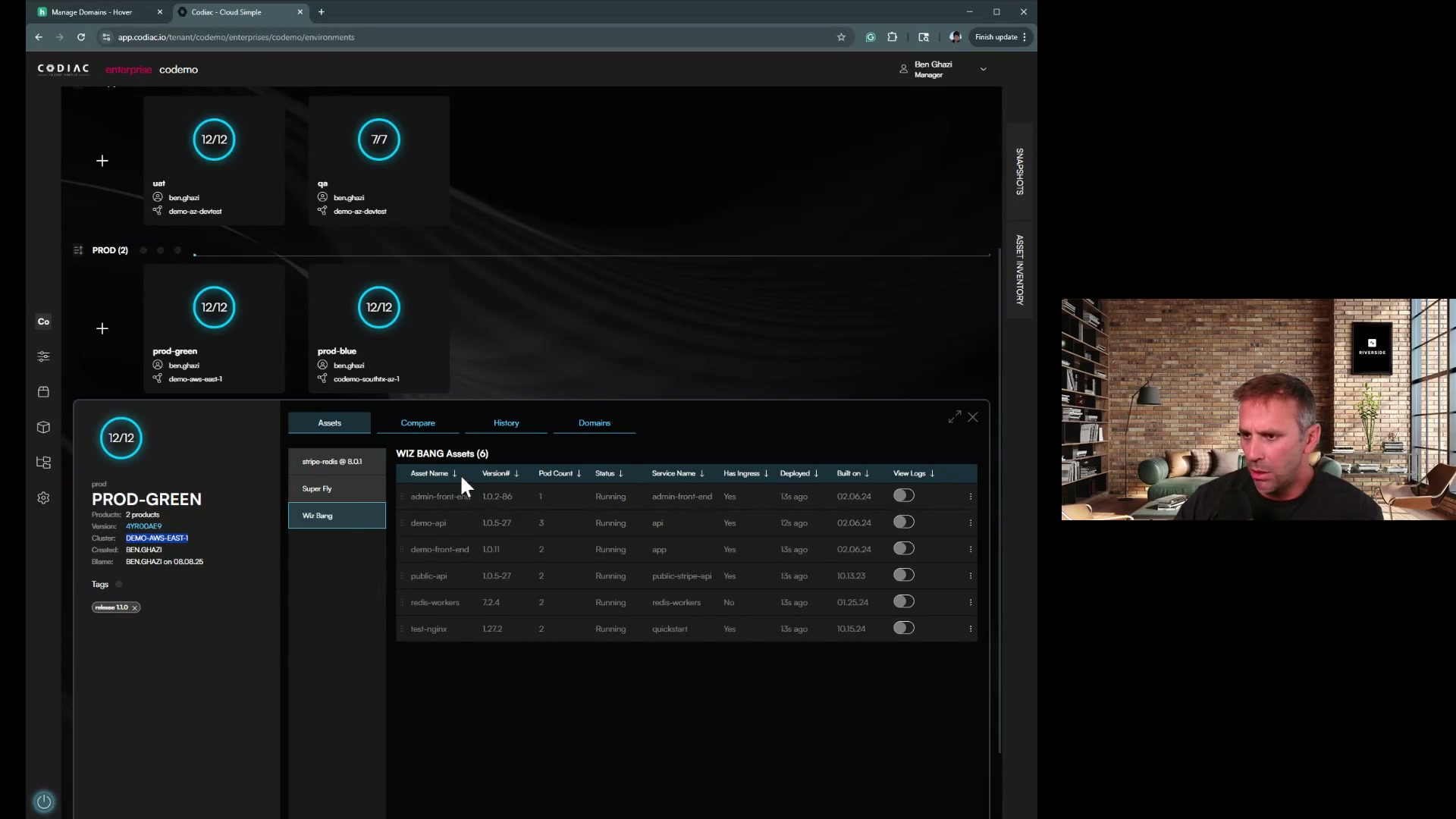
Recommendation: For production workloads, blue/green migration is the safest approach.
Pre-Upgrade Checklist
1. Version Compatibility Research
Task: Verify upgrade path and API compatibility
-
Check Kubernetes version skew policy
- Control plane can be N+1 ahead of nodes
- Kubectl can be N+1 or N-1 from control plane
- Don't skip minor versions (e.g., 1.28 → 1.29 → 1.30)
-
Review Kubernetes changelog for target version
- API deprecations and removals
- Feature gate changes
- Breaking changes in default behaviors
-
Check cloud provider compatibility (if using managed Kubernetes)
- EKS: Kubernetes version calendar
- AKS: Supported versions
- GKE: Release notes
Common Issues:
- API deprecations: v1beta1 APIs removed in K8s 1.25+ (Ingress, PodSecurityPolicy, etc.)
- PSP removal: PodSecurityPolicy removed in 1.25, migrate to Pod Security Standards
- Volume plugin deprecations: In-tree cloud provider volume plugins removed, use CSI drivers
2. Inventory Your Workloads
Task: Document all running workloads and their configurations
-
List all deployments, statefulsets, and daemonsets
kubectl get deployments,statefulsets,daemonsets --all-namespaces -o wide -
Identify critical vs non-critical workloads
- Production user-facing services (highest priority)
- Background jobs (can tolerate brief disruption)
- Development/staging workloads (lowest priority)
-
Document dependencies
- Database connections
- External APIs
- Inter-service communication
- StatefulSets with persistent volumes
-
Check for deprecated APIs in your manifests
# Use kubectl-convert or pluto to detect deprecated APIs
kubectl-convert -f deployment.yaml --output-version apps/v1

# Or use Pluto (recommended)
pluto detect-files -d ./manifests/
Output: Spreadsheet or document listing all workloads with criticality, dependencies, and API versions.
3. Test Application Compatibility
Task: Verify your applications work on the target Kubernetes version
-
Create a test cluster with the target Kubernetes version
# EKS example
eksctl create cluster --name test-k8s-130 --version 1.30

# GKE example
gcloud container clusters create test-k8s-130 --cluster-version=1.30 -
Deploy a representative sample of your workloads to the test cluster
- At least one instance of each workload type
- Include workloads using deprecated APIs
-
Run integration tests
- Application health checks
- Database connectivity
- API endpoints
- Background job execution
-
Load test critical services
# Example: Apache Bench for API load testing
ab -n 10000 -c 100 https://api-test.example.com/health -
Monitor for warnings/errors in logs
kubectl logs -f deployment/my-app -n production | grep -i "deprecated\|warning\|error"
Pass Criteria: All tests pass with no API deprecation warnings.
4. Backup Everything
Task: Create backups before making any changes
-
Backup etcd (control plane state)
# Managed Kubernetes: Check provider's backup mechanisms
# EKS: Use EKS snapshots
# Self-managed: Use etcdctl snapshot

ETCDCTL_API=3 etcdctl snapshot save backup.db \
  --endpoints=https://127.0.0.1:2379 \
  --cacert=/etc/kubernetes/pki/etcd/ca.crt \
  --cert=/etc/kubernetes/pki/etcd/server.crt \
--key=/etc/kubernetes/pki/etcd/server.key -
Backup all application manifests
# Export all resources
kubectl get all --all-namespaces -o yaml > all-resources-backup.yaml

# Export custom resources
kubectl get crd -o yaml > crds-backup.yaml -
Backup persistent volume data
- Take cloud provider volume snapshots (EBS, Azure Disk, GCE PD)
- Or use backup tools like Velero
velero backup create pre-upgrade-backup --include-namespaces='*' -
Export cluster configuration
# Save current cluster info
kubectl cluster-info dump --output-directory=./cluster-backup
Critical: Store backups in a separate region/storage location from the cluster.
5. Plan Your Rollback Strategy
Task: Define how to revert if the upgrade fails
Blue/Green Strategy (Recommended):
- Keep old cluster running during validation
- Document DNS/load balancer cutover process
- Test traffic switch back to old cluster
- Define rollback decision criteria (error rate > 1%, latency > 500ms, etc.)
In-Place Strategy:
- Document etcd restore procedure
- Prepare node image rollback (if using custom AMIs/images)
- Define maximum acceptable downtime (e.g., "abort upgrade if > 15 min downtime")
Rollback Decision Tree:
Is production impacted?
├─ Yes → Immediate rollback
│   ├─ Error rate > 5%
│   ├─ Latency > 2x baseline
│   └─ Critical service unavailable
└─ No → Proceed with caution
    └─ Monitor for 1-2 hours before decommissioning old cluster
6. Communication Plan
Task: Notify stakeholders about the upgrade
-
Schedule upgrade during low-traffic window
- Check historical traffic patterns
- Avoid end-of-month, holidays, or product launches
-
Notify teams 1 week in advance
- Platform team
- Application developers
- On-call engineers
- Customer support (if user-facing)
-
Create upgrade runbook document
- Step-by-step upgrade procedure
- Rollback steps
- Contact information for key personnel
- Link to this checklist
-
Establish communication channel
- Dedicated Slack channel (#cluster-upgrade)
- Video call for real-time coordination
- Incident escalation path
Sample Notification:
Subject: Kubernetes Cluster Upgrade - [Date] [Time]
We will be upgrading the production Kubernetes cluster from version 1.28 to 1.29 on [Date] at [Time].
Impact: Zero expected downtime (blue/green migration) Duration: 30-60 minutes Rollback Plan: Immediate traffic switch to old cluster if issues occur
Please ensure all deployments use non-deprecated APIs. See upgrade runbook: [Link]
During Upgrade: Execution Checklist
Blue/Green Migration Steps
Step 1: Create New Cluster
-
Provision new cluster with target Kubernetes version
# Example: EKS
eksctl create cluster --name prod-k8s-130 --version 1.30 --region us-west-2

# Example: GKE
gcloud container clusters create prod-k8s-130 --cluster-version=1.30 --region us-central1 -
Configure cluster networking (VPC, subnets, security groups)
-
Install cluster addons
- CNI plugin (Calico, Cilium, AWS VPC CNI)
- Metrics server
- Cluster autoscaler
- Ingress controller (NGINX, ALB, etc.)
- Certificate manager
- Monitoring stack (Prometheus, Grafana)
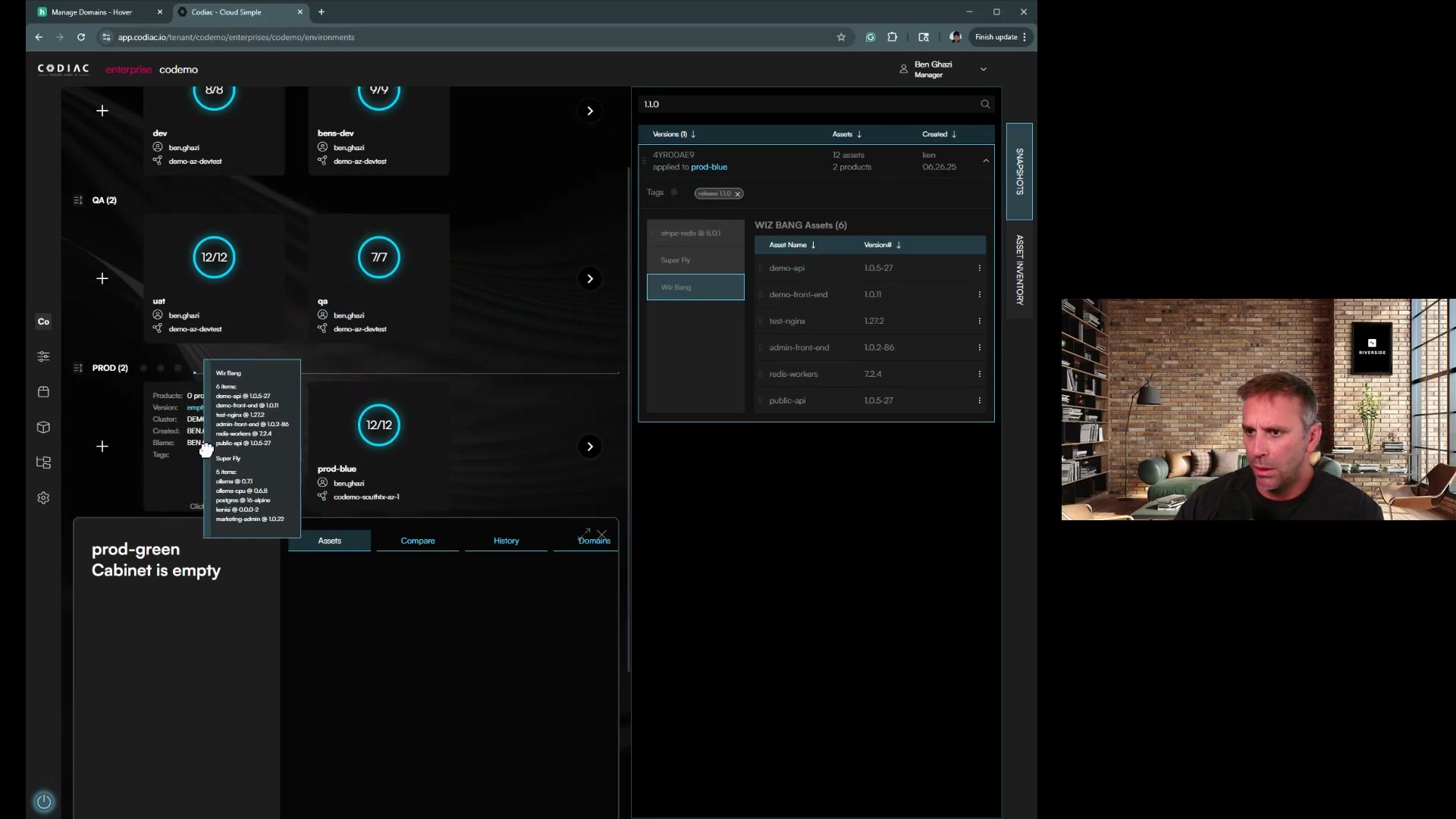
Step 2: Deploy Applications to New Cluster
-
Deploy infrastructure components first
- Namespaces
- ConfigMaps
- Secrets
- RBAC policies
- Custom Resource Definitions (CRDs)
-
Deploy applications in order of criticality
- Start with non-critical workloads
- Then background workers
- Finally, user-facing services
-
Verify all pods are running
kubectl get pods --all-namespaces | grep -v "Running\|Completed" -
Check for crashlooping pods
kubectl get pods -A --field-selector=status.phase!=Running,status.phase!=Succeeded
Step 3: Validate New Cluster
-
Run health checks on all services
# Check all service endpoints
kubectl get endpoints --all-namespaces -
Test application functionality
- API health endpoints
- Database connections
- External integrations
- Background job execution
-
Send test traffic to new cluster
- Canary test: Route 1-5% of traffic to new cluster
- Monitor error rates and latency
- Validate logs for errors
-
Performance validation
- CPU/memory usage within normal range
- No resource exhaustion warnings
- Autoscaling functioning correctly
Go/No-Go Decision:
- All pods healthy: ✅
- Health checks passing: ✅
- Test traffic successful: ✅
- No errors in logs: ✅
- Performance metrics normal: ✅
If all checks pass → Proceed to cutover
Step 4: Traffic Cutover
-
Update DNS or load balancer to point to new cluster
# Example: Update Route53 DNS
aws route53 change-resource-record-sets \
  --hosted-zone-id Z1234567890ABC \
  --change-batch file://dns-update.json

# Example: Update load balancer target group
aws elbv2 modify-target-group \
  --target-group-arn arn:aws:elasticloadbalancing:... \
--targets Id=new-cluster-nodes -
Monitor traffic shift in real-time
- Watch request volume on new cluster
- Watch request volume decreasing on old cluster
- Monitor error rates on both clusters
-
Wait for DNS TTL to expire (typically 60-300 seconds)
-
Verify all traffic is on new cluster
# Check request counts
kubectl top pods --all-namespaces --containers
Step 5: Monitor and Validate
-
Monitor for 1-2 hours after cutover
- Error rates < 0.5%
- Latency within 10% of baseline
- No crashlooping pods
- Database connections stable
-
Check application logs for errors
kubectl logs -f deployment/my-app -n production --tail=100 -
Validate business metrics
- User signups, transactions, API calls normal
- No customer complaints
-
Test rollback procedure (don't execute, just verify readiness)
- Can you switch DNS back to old cluster in < 2 minutes?
If any issues occur: Execute rollback immediately (switch traffic back to old cluster).
Step 6: Decommission Old Cluster
Wait at least 24-48 hours before decommissioning old cluster.
-
Confirm new cluster is stable for 24-48 hours
-
Take final backup of old cluster (just in case)
-
Drain old cluster
kubectl drain <node-name> --ignore-daemonsets --delete-emptydir-data -
Delete old cluster
# EKS
eksctl delete cluster --name prod-k8s-128

# GKE
gcloud container clusters delete prod-k8s-128
Post-Upgrade Validation
Application Health Checks
- All critical services responding
- Background jobs processing
- Database connections stable
- Persistent volumes mounted correctly
Performance Validation
- CPU/memory usage within normal range
- API latency within SLA (e.g., p95 < 200ms)
- No resource quota exceeded errors
- Autoscaling functioning correctly
Security Validation
- RBAC policies functioning
- Network policies enforced
- Secrets accessible by authorized pods only
- TLS certificates valid and renewing
Monitoring & Logging
- Prometheus scraping metrics
- Logs flowing to centralized logging (ELK, Splunk, etc.)
- Alerts configured and firing correctly
- Dashboards showing data from new cluster
Common Pitfalls & How to Avoid Them
1. API Deprecation Surprises
Problem: Deployment fails because you're using deprecated APIs (e.g., extensions/v1beta1 Ingress).
Solution:
- Run
kubectl-convertorplutobefore upgrade - Update manifests to stable API versions
- Test deployments on new cluster before cutover
2. Pod Security Policy Removal (K8s 1.25+)
Problem: PodSecurityPolicy was removed in K8s 1.25, breaking pod creation.
Solution:
- Migrate to Pod Security Standards before upgrading to 1.25
- Use Pod Security Admission instead of PSP
- Reference: Kubernetes PSP Migration Guide
3. Persistent Volume Issues
Problem: Pods can't mount persistent volumes on new cluster.
Solution:
- Use CSI drivers instead of in-tree volume plugins
- Pre-create PersistentVolumes with correct zone/region affinity
- Test volume mounting before cutover
4. Insufficient Node Capacity
Problem: New cluster nodes can't schedule all pods due to insufficient CPU/memory.
Solution:
- Right-size node groups before deployment
- Enable cluster autoscaler
- Monitor node utilization during migration
5. Certificate Expiration
Problem: Kubernetes control plane certificates expire during upgrade.
Solution:
- Check certificate expiration before upgrade
kubeadm certs check-expiration - Renew certificates if < 30 days remaining
6. Network Plugin Compatibility
Problem: CNI plugin version incompatible with new Kubernetes version.
Solution:
- Check CNI plugin compatibility matrix
- Upgrade CNI plugin before Kubernetes upgrade (if in-place)
- Install correct CNI version on new cluster (if blue/green)
Automated Solution: Codiac's Blue/Green Cluster Upgrades
Manual cluster upgrades following this checklist take 2-4 hours of careful coordination. Codiac automates this entire process with built-in blue/green cluster migration. Designed for platform teams who want infrastructure operations to be repeatable and predictable.
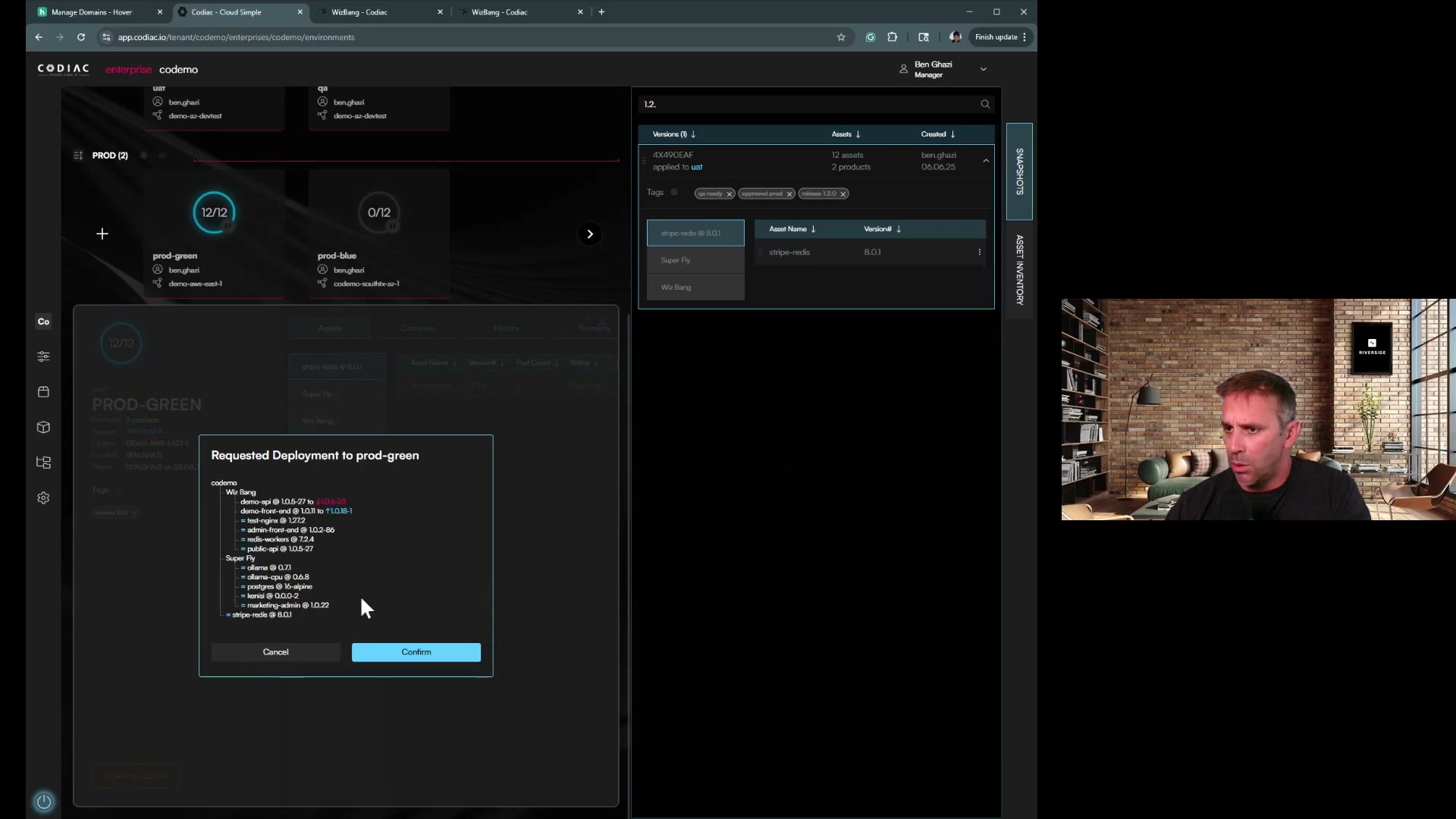
How Codiac Simplifies Upgrades:
| Step | What Codiac Does | Time |
|---|---|---|
| 1 | Create new cluster with target K8s version | 15 min |
| 2 | Deploy entire cabinet to new cluster (one command) | 5 min |
| 3 | Validate health checks automatically | 5 min |
| 4 | Traffic cutover (zero downtime) | 2 min |
| 5 | Monitor and validate | 5 min |
| Total | ~30 min |
The workflow:
# 1. Create new cluster
codiac cluster create
# CLI guides you through provider, region, and K8s version

# 2. Deploy cabinet to new cluster
codiac cabinet create
# Select cabinet and new cluster

# 3. Something wrong? Instant rollback
codiac snapshot deploy
# Select previous snapshot version
What you get:
- ✅ No YAML editing. CLI guides you through each step
- ✅ Automatic configuration inheritance across clusters
- ✅ Built-in health check validation before cutover
- ✅ Zero-downtime traffic switch
- ✅ Instant rollback via system versioning
Result: Upgrade from K8s 1.29 to 1.31 in 30 minutes instead of 4 hours, with zero risk to production.
Learn more about Codiac's Cluster Upgrades →
What's next
- Codiac Cluster Upgrades – Blue/green migration with Codiac
- Multi-Cluster Management – Manage multiple clusters from one place
- System Versioning – Snapshots and rollback
- Sandbox to Production – Move from sandbox to your own infra
External references: Kubernetes upgrade docs · EKS · AKS · GKE
Need help with cluster upgrades? Try Codiac free or schedule a demo to see blue/green cluster migration in action.